Give Your AI Agent a Financial Brain: Claude + Robinhood + Sorin
Claude can connect to Robinhood, read your portfolio, and even place trades through Robinhood’s new Trading MCP.
But access to your account doesn’t automatically give an AI agent deep market intelligence.
That’s where Sorin comes in.
Connect Claude to both Robinhood and Sahara AI’s MCP and the roles are clear:
Robinhood gives Claude access to your portfolio and execution.
Sorin gives Claude the market intelligence to understand what’s happening around it.
Now Claude can take what you actually own, run those positions through Sorin’s market intelligence, compare spot and futures conditions, surface what deserves your attention, and use that context throughout the rest of your workflow.
Here’s how to set it up and what you can do once it’s connected.
Step 1: Connect Robinhood to Claude
Robinhood now offers an official Trading MCP for AI agents.
Through it, Claude can access information including your portfolio, positions, balances, transaction history, watchlists, scans, and market data. Robinhood also supports agent-driven order placement through a dedicated Agentic Account.
Claude Desktop
In Claude Desktop:
Open Settings
Go to Connectors
Select Add custom connector
Add Robinhood’s Trading MCP
Authenticate with Robinhood
Robinhood will guide you through creating or connecting a dedicated Agentic Account during authentication.
Robinhood Agentic Trading setup guide
Claude Code
If you use Claude Code, Robinhood provides a one-command setup:
claude mcp add robinhood-trading --transport http https://agent.robinhood.com/mcp/trading
Then enter /mcp, select robinhood-trading, and authenticate.
Robinhood keeps execution separated from your normal brokerage accounts: the agent can read connected Robinhood account information, but trades can only be placed through the dedicated Agentic Account. Crypto trading also requires an associated Robinhood Crypto account and is subject to Robinhood’s availability and eligibility requirements.
Step 2: Connect Sorin to Claude through Sahara AI’s MCP
Next, give Claude access to Sorin.
Sorin’s Tools-as-a-Service makes its crypto market intelligence available outside of the Sorin app so Claude and other MCP-compatible agents can call it directly.
To get started:
Sign in to Sorin
Open Settings → API Key
Create your Sorin API key
Add the Sahara AI MCP to Claude using the connection configuration in the TaaS documentation
Authenticate with your Sorin API key
Sahara AI Tools-as-a-Service documentation
Once both MCPs are connected, Claude has access to two very different kinds of information in the same workflow:
Robinhood: What do I own? How much? What is my account doing?
Sorin: What is happening in the market around those assets right now?
That combination is where things get interesting.
Your Entire Portfolio Is Red. What Actually Happened?
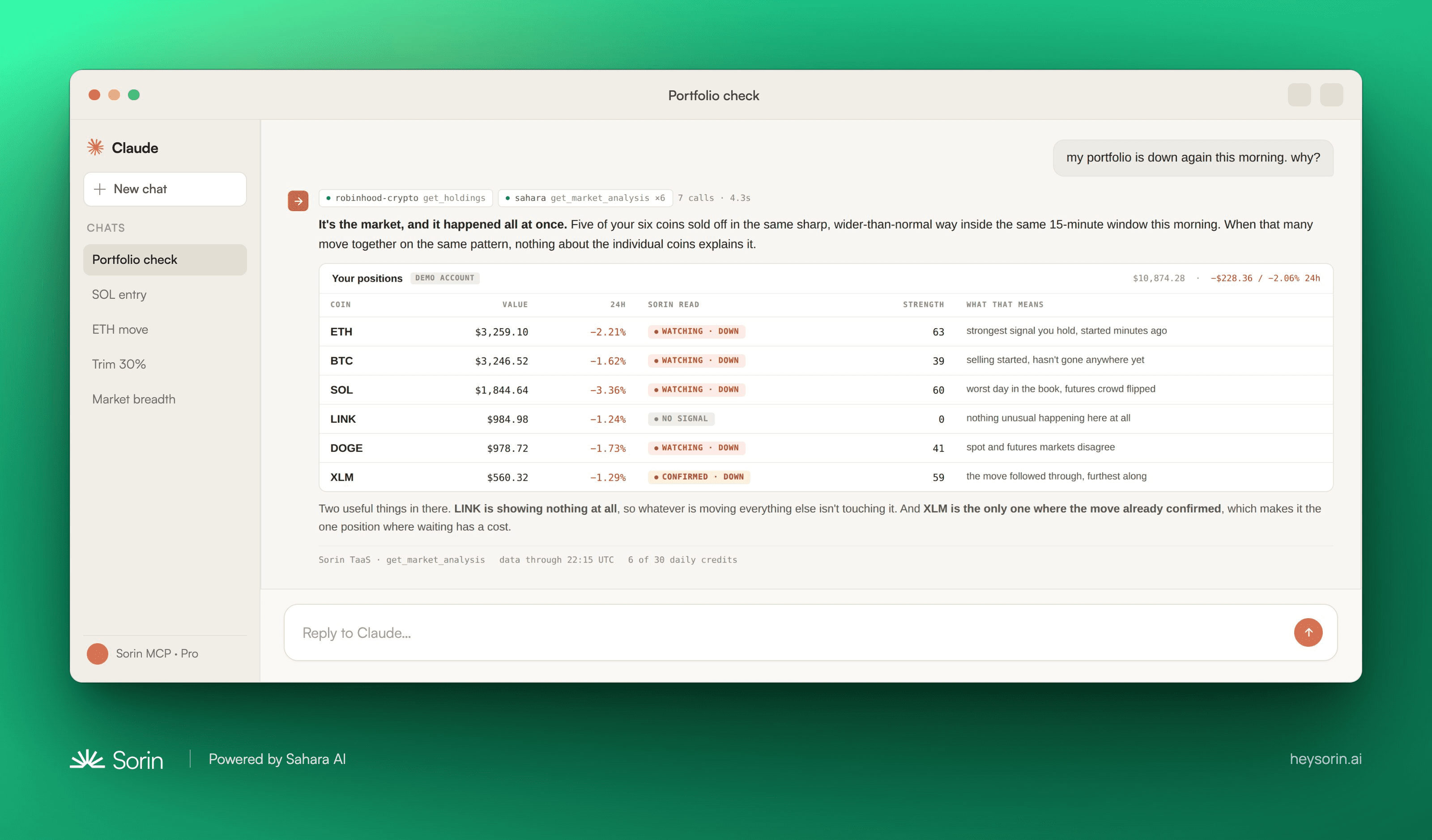
You open your portfolio and everything is down.
The immediate question isn’t necessarily what to sell.
It’s whether six different positions suddenly developed six different problems—or whether the whole market moved together.
Claude can pull your holdings from Robinhood and check each one against Sorin in the same workflow.
Imagine five positions sold off in nearly the exact same 15-minute window.
That’s useful context.
Instead of treating five red positions as five unrelated problems, Claude can recognize the pattern as a broad market move.
Then there’s LINK.
It’s also red, but Sorin isn’t seeing a strong enough directional signal around it.
Same red number on your portfolio screen. Very different context behind it.
SOL Is Finally Green. Do You Chase It?
Now say you’ve been watching SOL all week.
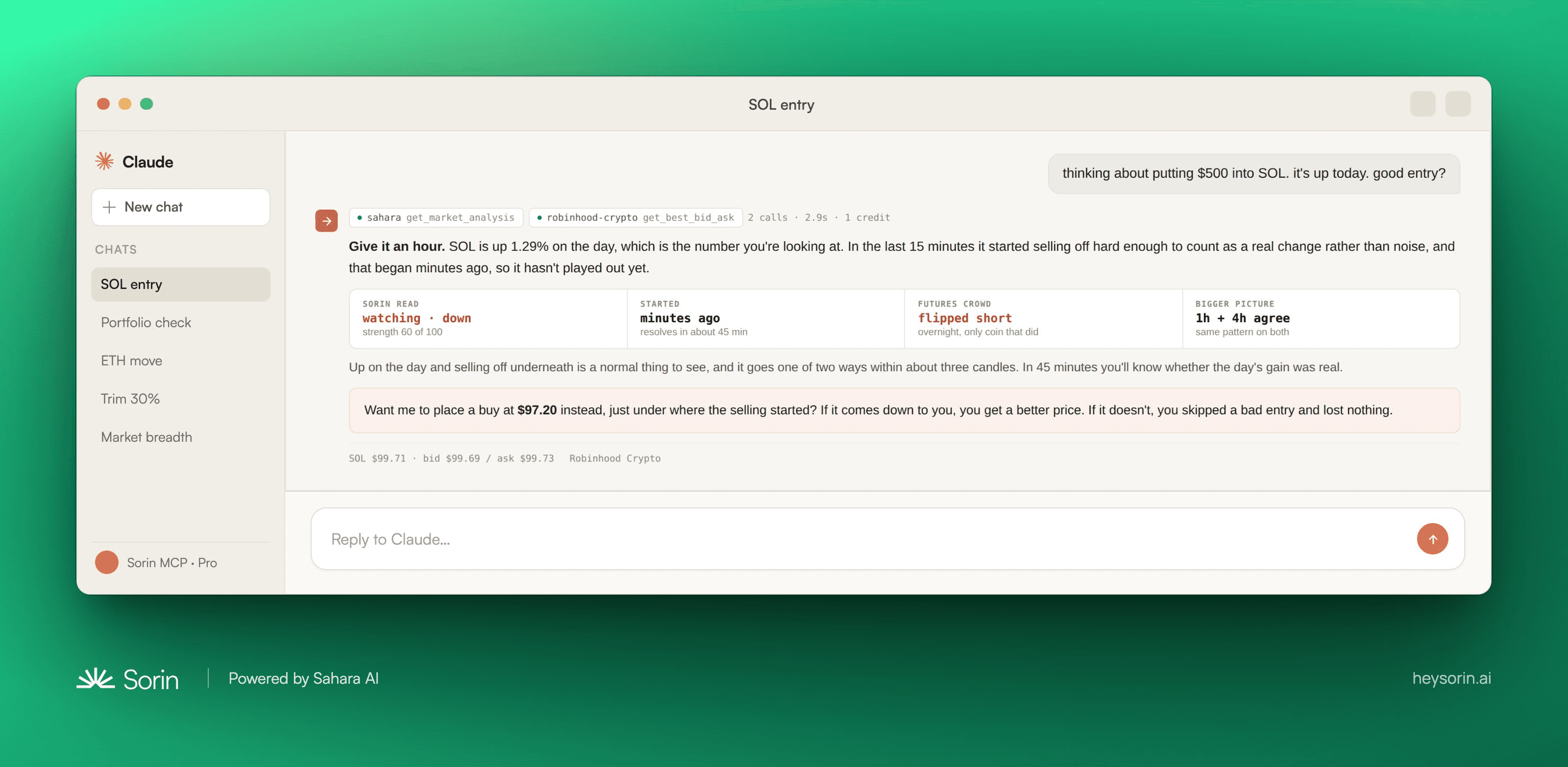
It’s finally moving. +1.29% on the day.
Easy moment to FOMO in.
Before you do, Claude checks Sorin.
The daily number is still green, but Sorin sees that the last 15 minutes have reversed sharply enough to trigger a fresh downside flag.
That changes what the daily price alone is telling you.
SOL may still be up on the day, but something just shifted in the short-term market structure.
Instead of chasing the green candle because you’re worried about missing the move, you have a reason to wait and see whether the reversal resolves.
ETH Drops. Is the Dip Actually Ready to Buy?
Price alone doesn’t tell you what happens next.
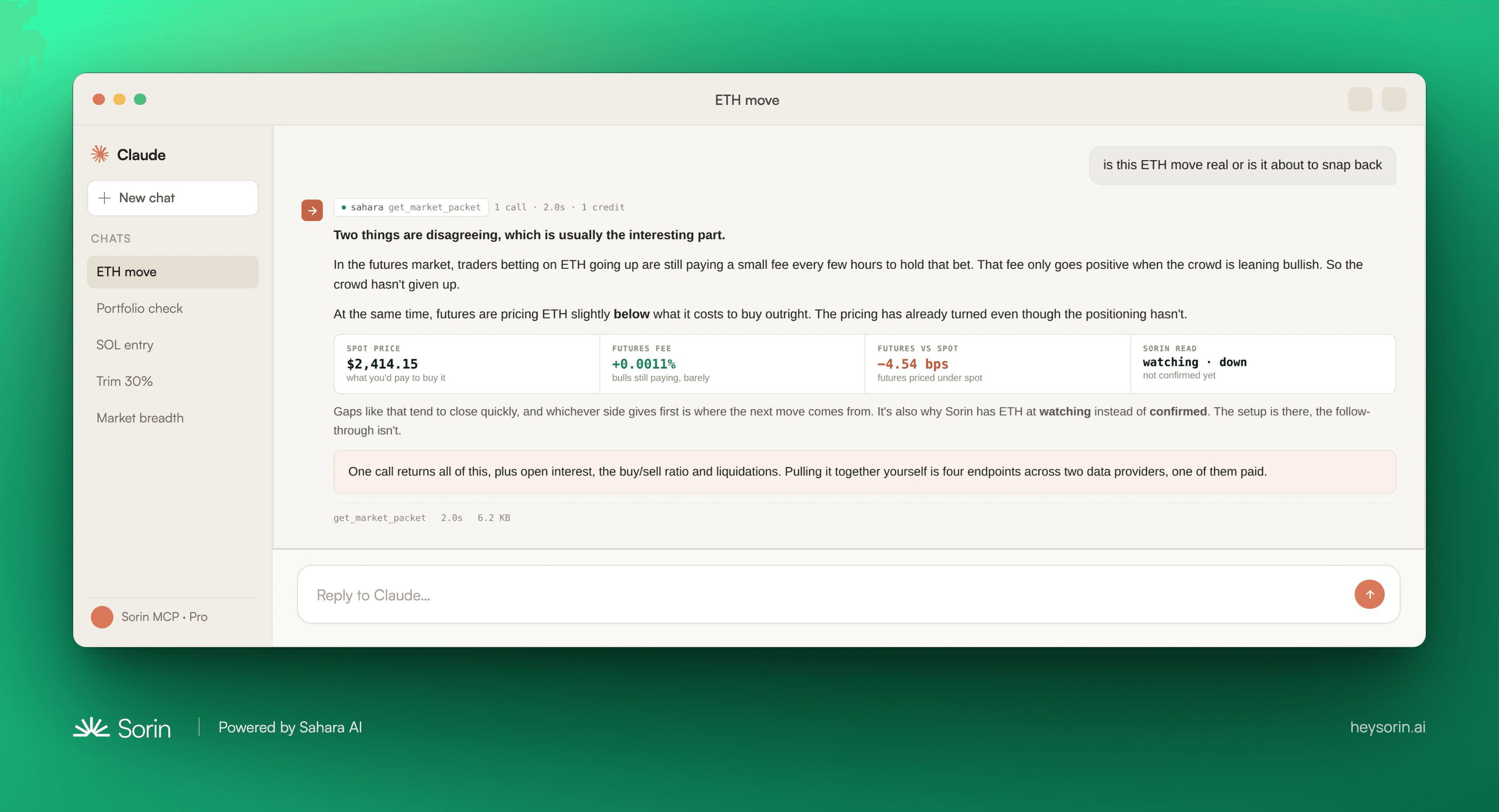
ETH falls.
Is the market already positioning for a bounce, or is there still more downside to clear?
This is where looking at futures alongside spot becomes valuable.
Sorin can see that longs are still paying to stay long even as futures slip below spot.
In other words, price is weakening before bullish positioning has fully cleared out.
If those longs begin unwinding, that creates additional downside risk.
The useful takeaway isn’t simply that ETH went down.
It’s that the market is giving you a reason not to rush the entry yet.
You Want to Reduce Exposure. What Goes First?
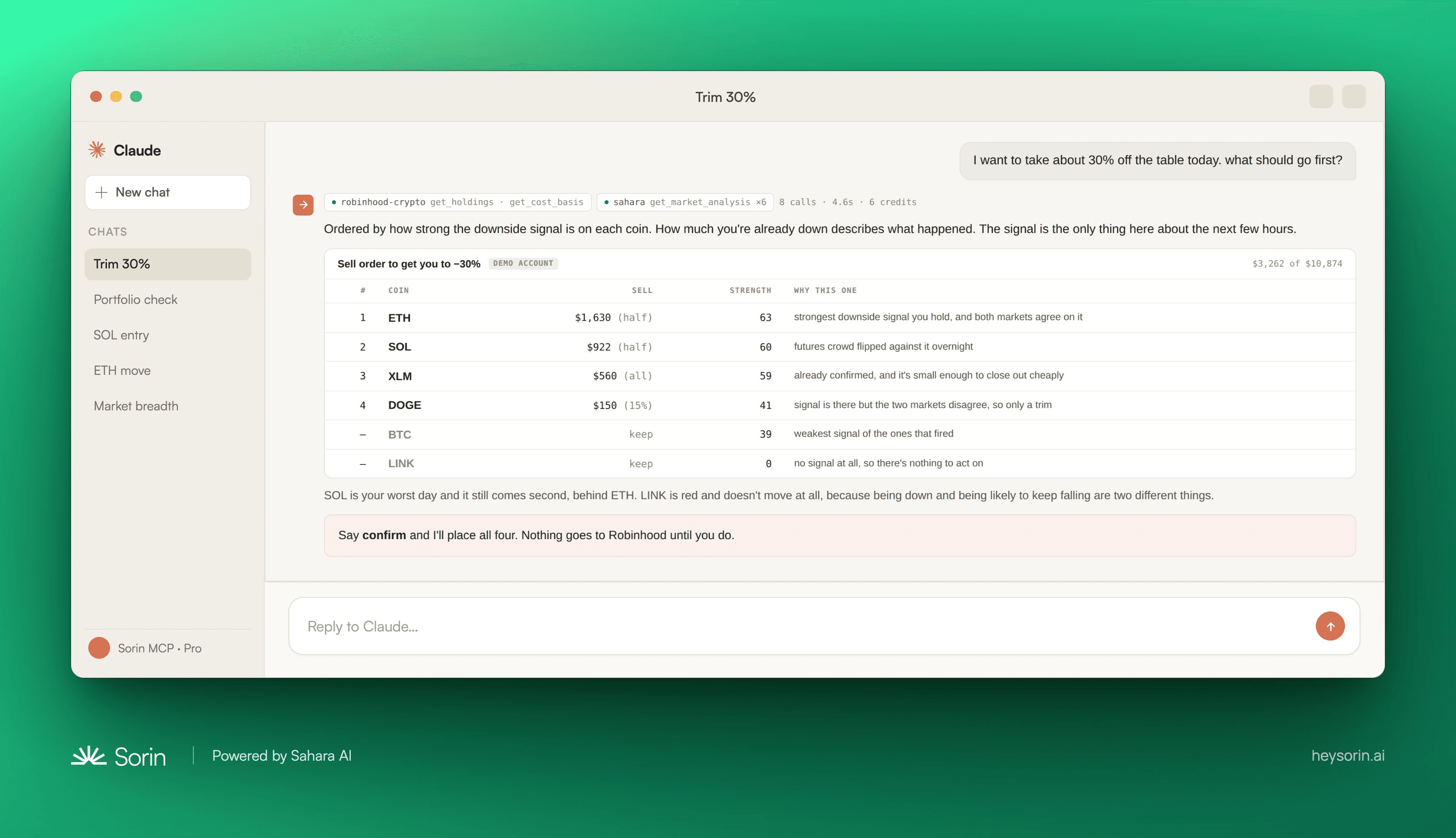
Now say you’ve already decided you want less risk in the portfolio.
Selling whatever has fallen the most feels intuitive.
But that’s backward-looking.
The asset that hurt you most yesterday isn’t automatically the asset with the weakest setup today.
Instead, Claude can take your current Robinhood positions and ask Sorin where the strongest downside conditions are right now.
ETH might come first because spot and futures are both pointing lower.
LINK might stay untouched—even though it is also red—because Sorin isn’t seeing a strong enough directional signal there.
Now the next move isn’t being ranked by which number on your portfolio looks the ugliest.
It’s being backed by current market data.
Stop Running the Same Checks Manually
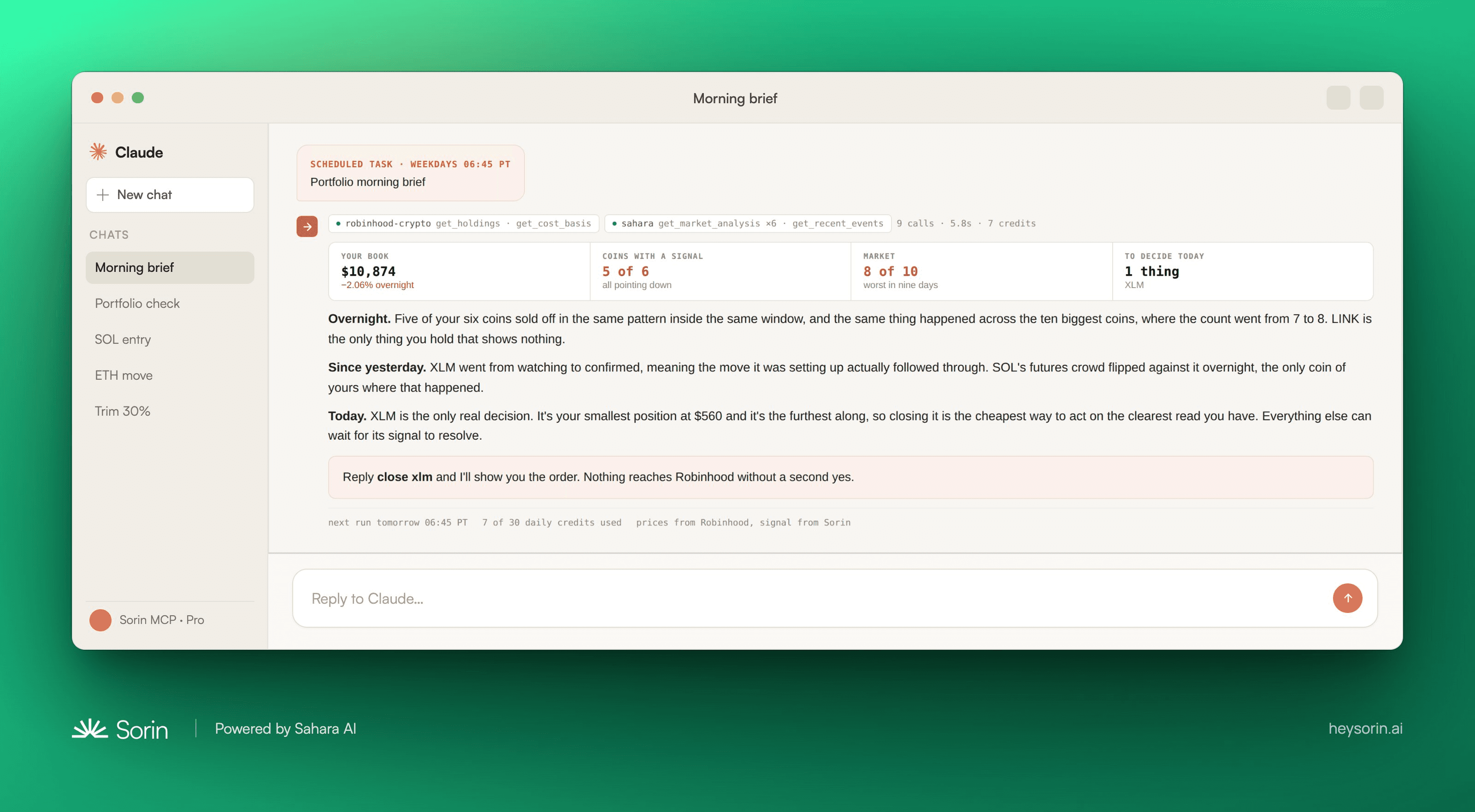
Once Claude can run this workflow, there’s little reason to rebuild it manually every morning.
Put it on a schedule.
At 6:45 AM, your workflow could already be checking:
What you currently hold
What moved overnight
Why those assets moved
Where Sorin is seeing strength or weakness
What actually deserves your attention
Suggested next steps to investigate
Instead of waking up, checking every position, opening charts, comparing markets, and trying to work out what changed overnight, your first market briefing can already be built around your actual portfolio.
And because Claude has access to both systems, you aren’t asking a generic AI, “What happened in crypto?”
You’re asking:
What happened in crypto that matters to me?
Never Pay for Market Data and AI Tools When You Hold $SAHARA.
Sorin TaaS is also part of a broader expansion of $SAHARA utility.
Stake $SAHARA and you can receive Sorin credits every month to use across workflows like these.
You aren’t spending the $SAHARA to make a market-data request.
You aren’t burning it every time your agent calls Sorin.
The tokens remain yours while staking unlocks recurring credits that your agents can use to access Sorin’s financial intelligence.
The rest of the market rents their edge. You just hold yours.
Start building with Sorin Tools-as-a-Service
This article is for informational and educational purposes only and does not constitute investment advice. Trading digital assets involves risk. Users are responsible for reviewing and approving their own investment decisions and for configuring appropriate permissions and safeguards for any AI agent with access to financial accounts.


